Shopify Website Issues and How to Fix Them
Shopify websites often face issues such as slow loading speed, app conflicts, SEO limitations, checkout errors, broken integrations, and poor mobile performance. These problems can impact user experience, conversions, and search rankings.
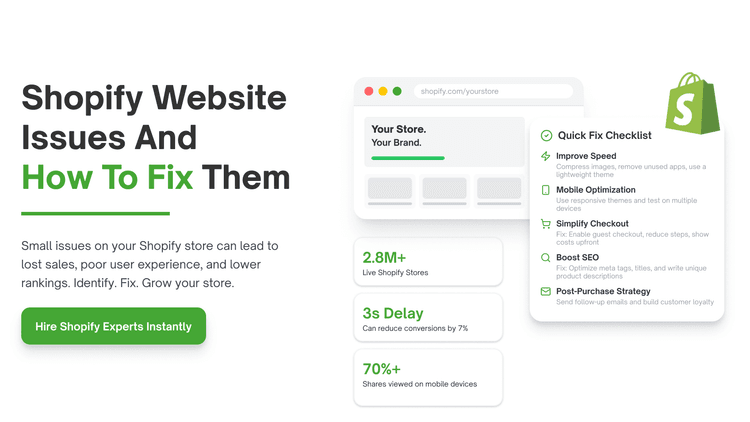
Table of Contents
You built the store, sourced the products, and spent time getting the design right. And yet the sales aren't coming, the bounce rate is climbing, or customers are dropping off.
If that sounds familiar, you're not dealing with bad luck. You're dealing with fixable problems. Shopify is one of the most capable eCommerce platforms available, but the platform itself is only the foundation. What sits on top of it, your designs, tech setup, marketing logic, and user experience, determines whether your store generates revenue or generates frustration.
This guide covers the most common Shopify website issues in plain terms. Majorly, what they are, why they happen, and exactly what you can do to resolve them.
Top Shopify Website Issues and How to Resolve Them?
Here are some common issues many ecommerce businesses face with their solutions.
1. Slow Page Load Speed
What's Happening
Your store takes more than three seconds to load. Visitors leave before they see a single product. You're paying for traffic that never converts because the page hasn't finished loading when patience runs out.
Why It Happens
The most common culprits are uncompressed images that are far larger than they need to be. And too many third-party apps running scripts in the background, bloated theme code, and embedded videos that load slowly. Many store owners install apps to solve specific problems and never remove them. Shopify powers over 5.1% of all websites and 7.2% of the CMS market, with nearly 3 million live stores as of April 2026. Even when they're no longer being used. Every inactive app still loads code, still adds weight, and still slows the page.
How to Fix It
Start with Google PageSpeed Insights. It's free and gives you a specific list of what's slowing your store down. Compress every image before uploading using a tool like TinyPNG or Shopify's compression. Audit your installed apps ruthlessly. If you haven't used it in the last 30 days, uninstall it. Consider a lightweight Shopify theme rather than a feature-heavy one loaded with animations.
2. Poor Mobile Experience
What's Happening
Your store looks reasonable on a desktop but breaks down on a phone. Buttons are too small to tap accurately. The text is too small to read without zooming. The checkout process requires too many steps on a small screen.
Why It Happens
Over 70% of eCommerce traffic now comes from mobile devices, but many store owners still design primarily for desktop. Themes that aren't genuinely responsive create a degraded experience on mobile that feels like a different store. Checkout flows that were tolerable on desktop become genuinely painful on a phone.
How to Fix It
Test your store on multiple actual devices, which doesn't represent the real experience. Use a Shopify theme that's built with mobile-first principles. Check that every button is large enough to tap comfortably with a thumb. Simplify the checkout flow for mobile users, minimise the number of form fields, and make guest checkout available. Or get a Shopify website development company for smooth operation. Google's mobile-first indexing also means that a poor mobile experience directly damages your search rankings.
3. Weak or Confusing Branding
What's Happening
Visitors land on your store, and within seconds, they can't tell what you sell, who it's for, or why they should buy from you rather than somewhere else. They leave without exploring further.
Why It Happens
Many new Shopify stores are launched with generic themes, stock photography, and product descriptions copied from suppliers. When everything looks the same, nothing stands out. Customers are buying from a brand they trust. A store that looks like every other dropshipping template doesn't inspire that trust.
How to Fix It
Define your value proposition before you touch your theme. It needs to be visible above the fold on your homepage. Invest in brand consistency across your colour palette, typography, photography style, and tone of voice. These elements compound over time and become the reason customers return.
4. Complicated Checkout Process
What's Happening
Customers add items to their cart and don't complete the purchase. Your cart abandonment rate, which averages nearly 70% across eCommerce is eating your revenue at the final step of the funnel.
Why It Happens
Forced account creation before checkout. Unexpected shipping costs appear only at the final step. Too many form fields. Limited payment options. A checkout flow that requires five steps when two would suffice. Each of these is a friction point, and friction at the checkout is catastrophic because the customer wanted to buy.
How to Fix It
Enable guest checkout so first-time customers don't have to create an account to complete a purchase. Be transparent about shipping costs as early as possible in the shopping experience. Enable Shopify Payments to offer a streamlined, native checkout experience. Add trusted payment badges (Stripe, PayPal, secure checkout indicators) to reduce security anxiety.
5. Ineffective SEO and No Organic Traffic Strategy
What's Happening
Your store gets no traffic unless you're running paid ads. The moment you pause a campaign, sales stop. You're entirely dependent on paid acquisition with no organic baseline.
Why It Happens
Most new Shopify merchants focus on paid advertising first and treat SEO as something to deal with later. Later rarely comes. The result is a store with no optimised title tags, generic meta descriptions, and product descriptions that are identical to supplier copy.
How to Fix It
Start with the basics. Every product page needs a unique title tag that includes the primary keyword a buyer would use to find that product. Meta descriptions should be written to earn the click, not just describe the page. Product descriptions need to be original, detailed, and written with the customer's actual search language in mind. Build a blog strategy around the questions your target customers are genuinely asking. A well-written blog post that ranks for an informational query creates a traffic channel that pays dividends indefinitely.
6. No Post-Purchase Strategy
What's Happening
A customer buys once, and you never hear from them again. You're spending money acquiring new customers while ignoring the ones who have already demonstrated they trust you enough to purchase.
Why It Happens
Most Shopify merchants treat the order confirmation as the end of the customer relationship. It should be the beginning. The economics of customer retention are compelling, costing five to twenty-five times more than retaining an existing one. Despite this, post-purchase email flows, loyalty programmes, and re-engagement strategies are consistently the most underdeveloped parts.
How to Fix It
Build a post-purchase email sequence immediately. The sequence should include a thank-you email sent immediately after purchase, a shipping update when the order is dispatched, a check-in email two weeks after, and a follow-up with a discount code at the appropriate interval for your product category.
Implement a loyalty programme that rewards repeat purchases. Create a reason for customers to come back before they've forgotten your brand exists. The revenue from your second and third sales to the same customer is where sustainable Shopify businesses become profitable.
7. Ignoring Analytics and Making Decisions Without Data
What's Happening
You're making changes to your store based on intuition tweaking the homepage, changing product photos, adjusting prices without knowing whether those changes are improving performance.
Why It Happens
Shopify provides solid analytics tools, but many store owners either don't look at them regularly or don't know which metrics actually matter. Without a clear baseline and a measurement framework, every change is a guess.
How to Fix It
Set aside time every week to review four core metrics: conversion rate, average order value, customer acquisition cost, and traffic sources. These four numbers tell you almost everything you need to know about the health of your store. If you're getting conversions but a low average order value, you have an upsell and bundling opportunity.
The Underlying Problem Behind All of These Issues
Every one of these Shopify website issues has a technical dimension, but the root cause is almost always a strategic one. Stores that struggle aren't usually struggling because they chose the wrong app or the wrong theme. They're struggling because the decisions that led to those technical outcomes weren't grounded in customer understanding or honest data.
The fix for a slow store is technical. The fix for a store that no one visits is strategic. The fix for a store that visitors leave without buying is experiential. Understanding which category your specific problems fall into is the first step.
How QuickHire Will Help These Website Issues?
QuickHire addresses common Shopify website challenges by providing on-demand access to vetted eCommerce experts. Instead of a business owner spending weeks learning to fix a slow load time or a complicated checkout process, QuickHire connects them with a specialist who can implement the surgical fix immediately. See how Shopify and ecommerce support on demand works in 4-hour or 8-hour sessions.
The platform bridges the gap between knowing what the problem is and actually executing the solution, reducing the downtime and revenue loss typically associated with hiring or upskilling in-house teams. For technical issues like inventory mismanagement or analytics setup. QuickHire provides a flexible workforce to audit the backend and apply fixes without the long-term commitment of a full-time developer, ensuring the store operates efficiently and competitively.
Conclusion: Shopify gives you an exceptional platform to build a profitable eCommerce business. What it can't do is substitute for the thinking, testing, and continuous improvement that turns a store into a business that lasts. If your store has performance problems, a professional audit is the most efficient way to get a clear picture of exactly what needs fixing and in what order.
FAQs
1. How does QuickHire reduce downtime for Shopify website issues?
QuickHire connects businesses with vetted Shopify experts within 10 minutes, enabling immediate troubleshooting. This minimizes downtime, prevents revenue loss, and ensures critical issues like checkout failures or site crashes are resolved quickly.
2. What types of Shopify issues can QuickHire experts solve instantly?
QuickHire experts can handle theme bugs, payment gateway errors, app conflicts, speed optimization, and UX issues. Businesses get on-demand support without long hiring cycles, ensuring uninterrupted store performance.
3. How is QuickHire more cost-effective than hiring a full-time Shopify developer?
Instead of paying fixed salaries, businesses pay only for the time and expertise needed. This makes QuickHire ideal for handling urgent issues, reducing operational costs while still accessing high-quality Shopify development support.
4. Can QuickHire support ongoing Shopify maintenance and optimization?
Yes, beyond quick fixes, businesses can repeatedly hire experts for updates, performance tuning, and feature enhancements. This flexible model ensures continuous improvement without long-term hiring commitments.
5. How does QuickHire ensure quality and reliability of Shopify experts?
QuickHire provides access to pre-vetted professionals with proven Shopify experience. Combined with real-time collaboration and accountability, this ensures businesses receive reliable, high-quality solutions without trial-and-error hiring.