The Product Demo Is In Two Hours. The Platform Is Down.
Your demo starts in two hours, and your platform just went down. Here's why outages hit at the worst moments, and how to recover before the call.
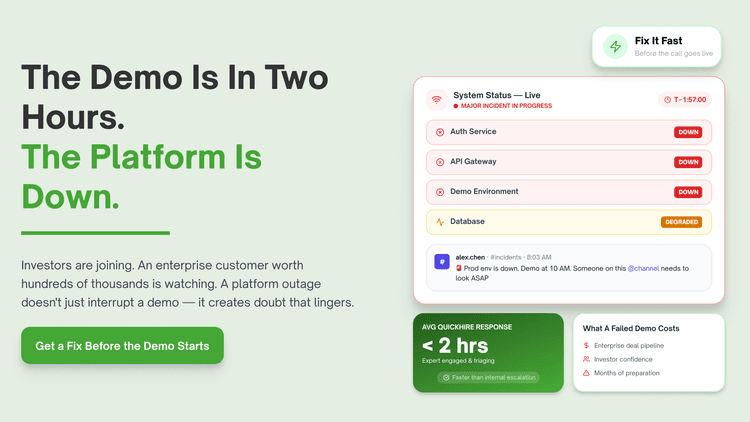
Your product demo is in two hours. The platform is down. You don't have time for a slow investigation.
This happens to growing companies more than anyone admits. High pressure moments expose weaknesses that normal traffic never reveals. Most outages before a demo trace back to something fixable in minutes, not hours.
Top custom stack outage issues and how to resolve them
Your staging environment doesn't match what you're about to show
You open your dashboard two hours before the demo. The staging build looks fine. Production shows a different version entirely.
What is happening: A recent deploy went to production but not staging, or the reverse. The environments have drifted apart silently. Nobody noticed until now.
What most teams miss: Most teams assume staging mirrors production by default. Configuration drift builds up quietly between deploys.
Business impact: Demoing a broken or outdated version in front of a prospect or investor can cost the deal entirely.
Industry trend: According to Google's SRE practices, configuration drift remains a leading cause of environment specific failures.
How to fix it:
Diff your staging and production environment variables right now using a tool like Doppler or Vault.
Confirm which version is actually deployed using your CI/CD pipeline logs.
Roll back to the last known working version if the mismatch can't be resolved in time.
And the worst part? You had no warning. The drift had been building for weeks.
This is the step most teams skip. Forward pull: Even with the right version live, the platform itself might still be unstable.
A recent deploy introduced a bug nobody caught yet
What is happening: Code shipped earlier today looks fine in normal testing. A specific demo flow triggers a bug. Nobody ran that exact path before now.
What nobody tells you is this: Most teams test common flows thoroughly. Demo specific paths often get skipped during regular QA.
Business impact: A bug surfacing live during a demo damages credibility faster than almost any other failure.
Industry trend: Research suggests last minute deploys before high stakes events are a common, avoidable cause of live failures.
How to fix it:
Freeze deploys at least four hours before any scheduled demo.
Run through the exact demo script manually right now, end to end.
Roll back the last deploy immediately if the bug traces to it.
Nobody tells you this upfront. You find out live, in front of the people who matter most.
Forward pull: Sometimes the bug isn't new code. It's old infrastructure buckling under sudden load.
Your server can't handle the load you're about to put on it
You open your dashboard two hours before the demo. Response times are climbing already. Nobody is even using the platform yet.
What is happening: Background jobs or scheduled tasks are consuming resources right now. Your instance size was set for normal traffic, not a live demo spike.
What most teams miss: Most teams size infrastructure for average load. Demos often need temporary headroom that nobody planned for.
Business impact: A slow or unresponsive platform during a live demo undermines confidence regardless of the actual feature quality.
Industry trend: According to AWS scaling documentation, temporary capacity increases are commonly recommended before high visibility events.
How to fix it:
Manually scale up your instance size right now if your platform supports it.
Pause non critical background jobs until after the demo.
Check CPU and memory metrics in real time using CloudWatch or Datadog.
That is the part that actually hurts. The platform was struggling before anyone even logged in.
Forward pull: Even healthy infrastructure can fail if one connected service goes down without warning.
A third-party service you depend on just went down
What is happening: Your platform itself is fine. A payment processor, auth provider, or analytics service is having an outage. Your demo depends on that exact feature.
What most teams miss: Most teams don't check third-party status pages before high stakes moments. An external outage looks identical to your own failure from the user's side.
Business impact: A demo blocked by someone else's outage still reflects on your platform's reliability in the room.
Industry trend: Multiple major cloud outages in recent years have shown how dependent platforms are on a small number of providers.
How to fix it:
Check status pages for every critical dependency right now, including Stripe, Auth0, and AWS.
Prepare a fallback demo path that avoids the affected service.
Mention the outage briefly if it's public, rather than letting it look like your own bug.
Most developers know this. Most do not fix it.
Forward pull: Sometimes nothing is actually broken. The problem is what the audience sees on screen.
The demo environment has test data that looks broken
What is happening: Your demo account shows incomplete or messy data. Nothing is technically wrong. It just looks unfinished on screen.
What nobody tells you is this: Most teams use whatever data happens to exist. A demo account needs curated data, not leftover test records.
Business impact: A messy looking demo undermines trust even when every feature works correctly underneath.
Industry trend: Research suggests first impressions during product demos heavily influence purchase and investment decisions.
How to fix it:
Reset your demo account to a clean, curated data set right now.
Remove test orders, placeholder names, and broken sample records.
Run the full demo script once before the actual call to confirm it looks right.
It sounds obvious. Almost nobody does it.
Forward pull: Clean data won't help if your team can't agree on who's fixing what.
Your team is troubleshooting in five different directions at once
What is happening: Everyone on the team is investigating something different right now. Nobody is coordinating the effort. Two hours are disappearing fast.
What most teams miss: Most teams default to "everyone help" during a crisis. Uncoordinated troubleshooting wastes more time than it saves.
Business impact: Disorganized incident response under time pressure increases the chance of missing the actual root cause before the deadline.
Industry trend: According to Atlassian's incident management research, having a single incident lead measurably improves resolution speed.
How to fix it:
Name one person as incident lead right now, even informally.
Assign specific areas, frontend, backend, infrastructure, to specific people.
Set a check in every fifteen minutes until the issue is resolved or the demo starts.
This is the step most teams skip. Coordination feels slow until chaos costs more time.
Forward pull: Even a coordinated team can run out of time without the right expertise in the room.
Nobody on your team has fixed this exact problem before
What is happening: The root cause is becoming clear. Nobody on your team has handled this specific failure before. The clock is still running toward the demo.
What nobody tells you is this: Most teams have generalists who can investigate. Few have someone who has fixed this exact failure pattern under time pressure.
Business impact: Every minute spent learning a new problem live is a minute closer to demoing a broken platform.
Industry trend: According to Atlassian's incident research, time to engage the right responder is the strongest predictor of resolution speed.
How to fix it:
Identify the specific expertise needed, infrastructure, integration, or frontend.
Bring in outside help immediately rather than continuing to debug blind.
Brief the specialist with full context so they can act in minutes, not hours.
And the worst part? You had no warning. By the time you realized you needed help, the clock had already run down.
The real problem behind all of these issues
Every issue above comes from the same root cause. High pressure moments expose gaps that normal days never reveal. Custom stacks make this worse because every failure point is unique to your setup. The fix isn't hoping nothing breaks. It's having fast access to expertise when it does.
How QuickHire fixes this
When your platform goes down before a high stakes demo, you need a senior engineer who can diagnose unfamiliar failures fast under pressure. QuickHire connects you in minutes. Traditional hiring takes weeks. QuickHire’s on-demand technical support services assign a Project Manager within 10 minutes.
You pay for what you use. No salary. No contract. A specialist can join your incident immediately, isolate the failure, and help you reach a working state before the call starts.
This isn't about replacing your team. It's about having backup when every minute counts.
Conclusion: Demos don't wait for outages to resolve themselves. The right specialist can help you recover before the call starts. Hire a vetted custom stack expert on QuickHire today. No contracts. No wait.
Frequently asked questions
What should I do if my platform goes down right before a demo?
Check for configuration drift between staging and production, then confirm what was last deployed. Roll back immediately if a recent change is the likely cause.
How do I quickly find the cause of an outage with limited time?
Name one incident lead, assign specific areas to specific people, and check in every fifteen minutes. Coordinated troubleshooting finds the cause faster than everyone investigating alone.
Could a third-party service outage be the reason my platform looks down?
Yes, check status pages for every critical dependency including your payment processor and auth provider immediately. An external outage can look identical to your own failure.
How can I prepare my platform to avoid outages before important demos?
Freeze deploys several hours before the demo, scale up capacity temporarily, and run the full demo script in advance. QuickHire can connect you with a specialist to audit readiness before your next high stakes call.
Who should I contact when I have two hours to fix an outage before a demo?
Bring in a senior specialist immediately instead of debugging alone under pressure. QuickHire connects you with a vetted custom stack expert who can join your incident within minutes.