The Most Expensive Bug Is The One Nobody Notices
The bug costing you the most money right now isn't the one that crashed your site. Here's how silent bugs drain revenue, and how to find them before they grow.
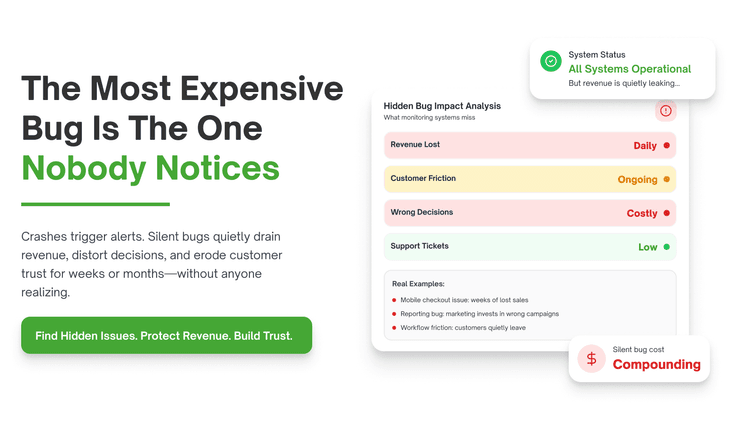
The most expensive bug is the one nobody notices. You don't get an alert. You don't get a crash report.
This happens across custom stacks more than anyone tracks. Silent bugs don't trigger monitoring because nothing technically breaks. Most of them cost more over months than a full outage costs in one night.
Top custom stack silent bug issues and how to resolve them
A pricing calculation is quietly wrong for some customers
You open your revenue report this month. Numbers look slightly off. Nothing in your error logs explains it.
What is happening: A discount or tax rule applies incorrectly for one specific customer segment. No error gets thrown. The charge just processes at the wrong amount.
What most stores miss: Most teams test pricing logic against common cases. Edge case segments rarely get the same testing attention.
Business impact: A pricing bug affecting even a small customer segment can quietly cost real revenue every single day it runs.
Industry trend: According to research from McKinsey on pricing, small systematic pricing errors compound significantly over time at scale.
How to fix it:
Audit pricing logic against every customer segment and discount combination.
Reconcile actual charges against expected charges for a recent sample period.
Add automated tests covering edge case pricing scenarios, not just standard ones.
And the worst part? You had no warning. The bug just kept running quietly.
This is the step most teams skip. Forward pull: Pricing isn't the only place numbers can drift without anyone noticing.
Your analytics are tracking the wrong event silently
What is happening: A tracking event fires under the wrong condition. Your dashboards show activity that doesn't reflect real behavior. Decisions get made on data that's subtly wrong.
What nobody tells you is this: Most teams set up analytics once and trust it indefinitely. Tracking code drifts from actual behavior as features change.
Business impact: Decisions based on inaccurate analytics can misdirect product priorities for months before anyone questions the data.
Industry trend: Research suggests analytics implementation errors are common and frequently undetected across growing product teams.
How to fix it:
Audit your tracking events against actual user actions using a tool like Segment debugger.
Cross check key metrics against a separate, independent data source.
Review tracking code after every major feature change, not just at launch.
Nobody tells you this upfront. You find out when a decision based on bad data goes wrong.
Forward pull: Sometimes the wrong number isn't what you're tracking. It's what you're storing.
A data type mismatch is silently truncating values
You open your database this month. A few records look slightly wrong. No error ever appeared in your logs.
What is happening: A field stores more precision than its column type allows. Values get silently rounded or truncated. Nobody notices because the numbers still look reasonable.
What most stores miss: Most teams trust database schemas set at launch. Precision mismatches often appear only after enough data accumulates.
Business impact: Silent data truncation can corrupt financial records in ways that take months to fully untangle.
Industry trend: According to database design research from PostgreSQL's own documentation, type mismatches are a common but underreported data integrity issue.
How to fix it:
Review column types for every financial or quantity field in your schema.
Run a query to check for unexpectedly rounded or truncated values.
Add validation at the application layer before data ever reaches the database.
That is the part that actually hurts. The data looked fine. It just wasn't accurate.
Forward pull: Even clean data can't help if your cache is quietly serving something outdated.
A cache is serving stale data without anyone realizing it
What is happening: Cached content doesn't refresh when the underlying data changes. Customers see outdated prices or availability. No error appears because the cache is technically working.
What most stores miss: Most teams set cache expiration once and never revisit it. Cache invalidation bugs hide easily because the page still loads normally.
Business impact: Customers seeing stale prices or stock levels can lead to fulfillment errors and support escalations.
Industry trend: According to engineering postmortems shared across multiple SaaS companies, cache invalidation remains a commonly cited source of subtle bugs.
How to fix it:
Audit cache expiration times against how frequently the underlying data actually changes.
Add cache busting on every write operation that touches cached data.
Log cache hit and miss rates to catch invalidation issues early.
Most developers know this. Most do not fix it.
Forward pull: Sometimes stale data isn't the problem. A silent retry loop quietly is.
A background job is silently retrying and duplicating work
What is happening: A failed job retries automatically. The retry logic doesn't check if the original action already succeeded. Some action happens twice without anyone noticing.
What nobody tells you is this: Most teams add retry logic to improve reliability. Few add idempotency checks to prevent duplicate side effects.
Business impact: Duplicate charges, duplicate emails, or duplicate inventory updates can quietly damage customer trust and accuracy.
Industry trend: Research suggests idempotency gaps are a frequent cause of duplicate processing bugs in distributed systems.
How to fix it:
Add idempotency keys to every retryable operation involving payments or inventory.
Review your job queue logs for repeated executions of the same task.
Set up alerts for jobs that retry more than a defined threshold.
It sounds obvious. Almost nobody does it.
Forward pull: Even careful retry logic can't catch a bug that only shows up for a small slice of users.
A bug only affects a small percentage of users, so nobody flags it
What is happening: A specific browser, region, or device type triggers a rare failure. Most users never see it. The few who do rarely report it clearly.
What most stores miss: Most teams prioritize bugs by report volume. Low frequency bugs affecting a real but small segment often get ignored indefinitely.
Business impact: A bug affecting even a small percentage of users can represent meaningful lost revenue at scale over time.
Industry trend: According to usability research from the Nielsen Norman Group, most users experiencing a bug never report it at all.
How to fix it:
Segment error logs by browser, region, and device to spot small clusters.
Use session replay tools like FullStory or Hotjar to see rare failures directly.
Treat low frequency, high impact bugs as priority, not background noise.
This is the step most teams skip. Quiet bugs don't generate loud complaints.
Forward pull: Even visible bugs can hide if nobody's specifically looking for the quiet ones.
Nobody on your team is specifically looking for silent bugs
What is happening: Your team responds to alerts and customer reports. Nobody is actively hunting for issues that generate neither. The most expensive bugs stay hidden by default.
What nobody tells you is this: Most teams are structured to react. Finding silent bugs requires someone actively looking, not waiting for a signal.
Business impact: Every month a silent bug runs undetected adds to a cost that eventually surfaces as a much larger problem.
Industry trend: According to McKinsey's research on technical debt, undetected defects accumulate cost significantly the longer they remain unresolved.
How to fix it:
Schedule a quarterly audit specifically looking for unreported, low visibility bugs.
Reconcile financial and analytics data against independent sources regularly.
Bring in a specialist who can audit your stack with fresh eyes.
And the worst part? You had no warning. The cost had already been adding up for months.
The real problem behind all of these issues
Every issue above comes from the same root cause. Silent bugs survive because nothing forces anyone to look for them. Custom stacks make this worse because every system hides issues differently. The fix isn't more alerts alone. It's expertise that knows where to look.
How QuickHire fixes this
When you suspect a silent bug is costing you money, you need a senior engineer who specializes in auditing systems for hidden defects. QuickHire connects you in minutes. Traditional hiring takes weeks. QuickHire provides software testing services that catch bugs before release, booked in 4-hour or 8-hour sessions.
You pay for what you use. No salary. No contract. A specialist can reconcile your data, audit your pricing logic, and trace exactly where revenue is quietly leaking.
This isn't about replacing your engineering team. It's about getting a fresh set of eyes on what they can't see from inside.
Conclusion: The most expensive bugs never trigger an alert. The right specialist can find them before the cost grows further. Hire a vetted custom stack expert on QuickHire today. No contracts. No wait.
Frequently asked questions
How do I find bugs that don't trigger any errors or alerts?
Reconcile your financial and analytics data against independent sources, and segment error logs by browser, region, and device. Silent bugs often hide in small, specific segments.
Why is my revenue slightly different from what my pricing logic should produce?
This usually points to a pricing or discount rule that's incorrect for a specific customer segment. Audit your pricing logic against edge cases, not just standard scenarios.
How can stale cached data cost a business money?
Customers can see outdated prices or stock levels, leading to fulfillment errors and support costs. Auditing cache expiration against actual data change frequency usually reveals the gap.
What is an idempotency bug and why does it matter?
It happens when retry logic duplicates an action, like a charge or inventory update, without checking if it already succeeded. QuickHire can connect you with a specialist who audits retry logic for exactly this kind of issue.
Who should audit my system for bugs that haven't triggered any complaints yet?
Bring in a specialist who focuses on finding hidden defects rather than waiting for reports. QuickHire connects you with a vetted custom stack expert who can audit your stack with fresh eyes.