The Mobile App Was Rejected 24 Hours Before
Your launch is tomorrow, and your app just got rejected. Here's why custom stack apps fail review at the last minute, and how to fix it fast.
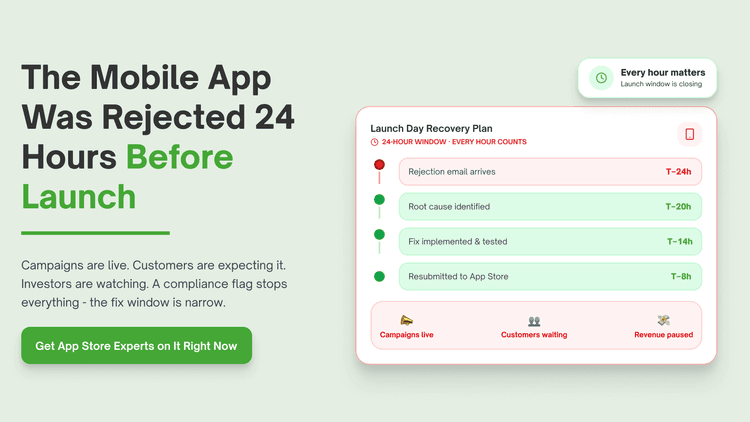
Your mobile app was rejected 24 hours before launch. You checked the rejection reason. It barely explains anything.
This happens to almost every custom built app at some point. Apple and Google change review standards constantly, often without much warning. Most teams only learn the real
Top custom stack mobile app rejection issues and how to resolve them
Your app got rejected for a vague guideline violation
You open your dashboard Monday morning. Launch is tomorrow. Apple's rejection note gives you one sentence and no real detail.
What is happening: The reviewer cited a guideline number. The explanation doesn't match what your app actually does. You're left guessing what to fix.
What most custom stacks miss: Most teams assume the stated reason is the full reason. Reviewers often cite the closest matching guideline, not the exact issue.
Business impact: Each rejection cycle can add one to seven days to your launch, according to typical App Store review turnaround times.
Industry trend: Apple's own App Review data shows guideline 2.1 app completeness issues remain among the most common rejection reasons.
How to fix it:
Read the full guideline section, not just the cited number.
Reply directly in App Store Connect's Resolution Center asking for clarification.
Test the exact flow the reviewer likely used, including edge cases.
And the worst part? You had no warning. The same build passed review last month.
This is the step most teams skip. Forward pull: Vague reasons are bad, but missing metadata causes its own kind of delay.
Your privacy labels don't match what your app actually does
What is happening: Your app collects data your privacy nutrition label doesn't mention. The mismatch triggered an automatic flag. You didn't update labels after a recent feature.
What nobody tells you is this: Most teams fill out privacy labels once at first submission. Every new SDK or feature can quietly change what data you collect.
Business impact: Privacy label mismatches can trigger rejection or, after launch, an account level warning from Apple.
Industry trend: According to Apple's developer documentation, privacy label accuracy is actively audited and a frequent source of rejection.
How to fix it:
Audit every third-party SDK in your app for data collection behavior.
Update your App Privacy details in App Store Connect before every submission.
Use a tool like AppFigures or Mobile Action to track SDK changes.
Nobody tells you this upfront. You find out the day you need to launch.
Forward pull: Privacy issues are bad. Crashes during review are worse.
Your app crashed during the reviewer's specific test path
You open your dashboard Monday morning. The rejection says "crashed on launch." Your build works fine on every device you tested.
What is happening: The reviewer used a device or iOS version you didn't test. A specific flow triggered a crash you never saw. The crash log wasn't included.
What most stores miss: Most teams test on their own devices. Reviewers test on whatever device Apple assigns that day.
Business impact: A crash during review can mean a full rejection cycle, costing days during a planned launch window.
Industry trend: Crashes and bugs remain one of the top cited reasons in Apple's published rejection guidelines.
How to fix it:
Test on the oldest supported iOS version, not just the newest.
Use Xcode's Organizer to review crash logs from TestFlight builds.
Run automated UI tests covering account creation and core flows.
That is the part that actually hurts. The crash only happened once. It happened at the worst time.
Forward pull: Crashes are visible. Some rejections come from something far less obvious.
A third-party SDK introduced a policy violation you didn't write
What is happening: Your ad network or analytics SDK changed its behavior in a recent update. That update violated a guideline. Your code never touched the violating logic.
What nobody tells you is this: Most teams trust SDK updates blindly. Third-party code runs inside your app under your responsibility, not the vendor's.
Business impact: SDK related rejections can stall a launch even when your own code never changed.
Industry trend: Research suggests SDK compliance issues are an increasing share of app rejections as ad and analytics tools expand permissions.
How to fix it:
Pin SDK versions and review changelogs before every release.
Test a full build after any third-party SDK update, not just your code.
Remove or replace SDKs that request permissions you don't actually need.
This is the step most teams skip. Reviewing vendor changelogs feels optional until it isn't.
Forward pull: Some rejections aren't about code at all. They're about what your screenshots promise.
Your screenshots or metadata promised something your app doesn't do
What is happening: Your app store listing shows a feature still in development. The reviewer tested against what you promised. The mismatch triggered rejection.
What most stores miss: Most teams update screenshots once, early, then forget them as the app evolves.
Business impact: Metadata mismatches can delay launch and also hurt your conversion rate after you do launch.
Industry trend: According to Apple's App Review Guidelines, metadata accuracy is explicitly listed as a common rejection trigger.
How to fix it:
Match every screenshot to the exact build you're submitting.
Remove feature mentions for anything not fully shipped.
Review your app description line by line against current functionality.
Most developers know this. Most do not fix it.
Forward pull: Even accurate metadata won't help if your account itself has a problem.
Your developer account has an unresolved compliance flag
What is happening: A past app or update triggered a compliance note on your account. You didn't resolve it. It's now blocking your current submission.
What nobody tells you is this: Most teams treat each app submission as independent. Apple and Google track compliance at the account level, not just the app level.
Business impact: An account level flag can block every app you submit until it's resolved, not just the one in question.
Industry trend: Google Play's developer policy center notes that repeated violations can affect account standing across all apps.
How to fix it:
Check your developer account status page for open flags before submitting.
Resolve any prior policy violation directly through the platform's appeal process.
Assign one person to monitor account health continuously, not just at submission time.
It sounds obvious. Almost nobody does it.
Forward pull: Even a clean account won't save you if nobody can respond fast enough.
Nobody on your team can respond to the rejection fast enough
What is happening: The rejection lands at 6pm. Your lead developer is offline. By the time anyone responds, you've lost a full review cycle.
What nobody tells you is this: Most teams have one person who understands app store submissions. Rejections often need fast turnaround, not deep investigation.
Business impact: Every extra day in the review queue can push your launch date, your marketing plan, and your investor update.
Industry trend: According to Apptopia's mobile launch research, delayed launches commonly cascade into broader marketing and revenue timeline slips.
How to fix it:
Build a response template for common rejection categories in advance.
Have a backup person trained on App Store Connect and Google Play Console.
Bring in outside expertise when your launch window is at risk.
And the worst part? You had no warning. By the time you found help, the window had already closed.
The real problem behind all of these issues
Every issue above traces back to the same root cause. App review rules shift constantly, and most teams only learn them after a rejection. Custom stacks make this worse because submissions often touch multiple SDKs and platforms at once. The fix isn't guessing better. It's faster expertise the moment a rejection lands.
How QuickHire fixes this
When your app gets rejected close to launch, you need a mobile release specialist who has handled App Store and Google Play resubmissions before. QuickHire connects you in minutes. Traditional hiring takes weeks. QuickHire offers mobile app maintenance services for store rejections in 4-hour or 8-hour sessions.
You pay for what you use. No salary. No contract. A specialist can read the actual rejection, fix the flagged issue, and resubmit with the right documentation attached.
This isn't about replacing your mobile team. It's about closing the gap during a deadline that can't move.
Conclusion: App store rejections rarely wait for a convenient time. The right specialist can turn a rejection around in hours. Hire a vetted custom stack expert on QuickHire today. No contracts. No wait.
Frequently asked questions
Why was my app rejected right before launch with no clear reason?
Apple and Google often cite a general guideline number rather than the exact issue. Read the full guideline text, then test the specific flow the reviewer likely used.
How long does it take to resubmit a rejected app?
Most resubmissions go through review again within one to seven days, depending on the platform and issue type. Fixing the root cause first avoids a second rejection.
What is the most common reason apps get rejected?
App completeness issues, crashes, and metadata mismatches remain among the most cited reasons across both app stores. Privacy label accuracy is also frequently flagged.
Can a third-party SDK cause my app to get rejected?
Yes, an SDK update can introduce a policy violation even without any changes to your own code. QuickHire can connect you with a specialist who audits SDK behavior fast.
Who can help fix an urgent app store rejection before a launch deadline?
A mobile release specialist familiar with App Store Connect and Google Play Console can usually resolve this within hours. QuickHire connects you with a vetted expert on demand.